AWS Step Functions Data Engineering Project
Event-driven serverless pipeline that automatically ingests CSV files from S3, validates schema, deduplicates rows, and loads data into RDS PostgreSQL — with email alerts for every outcome.
View on GitHub ↗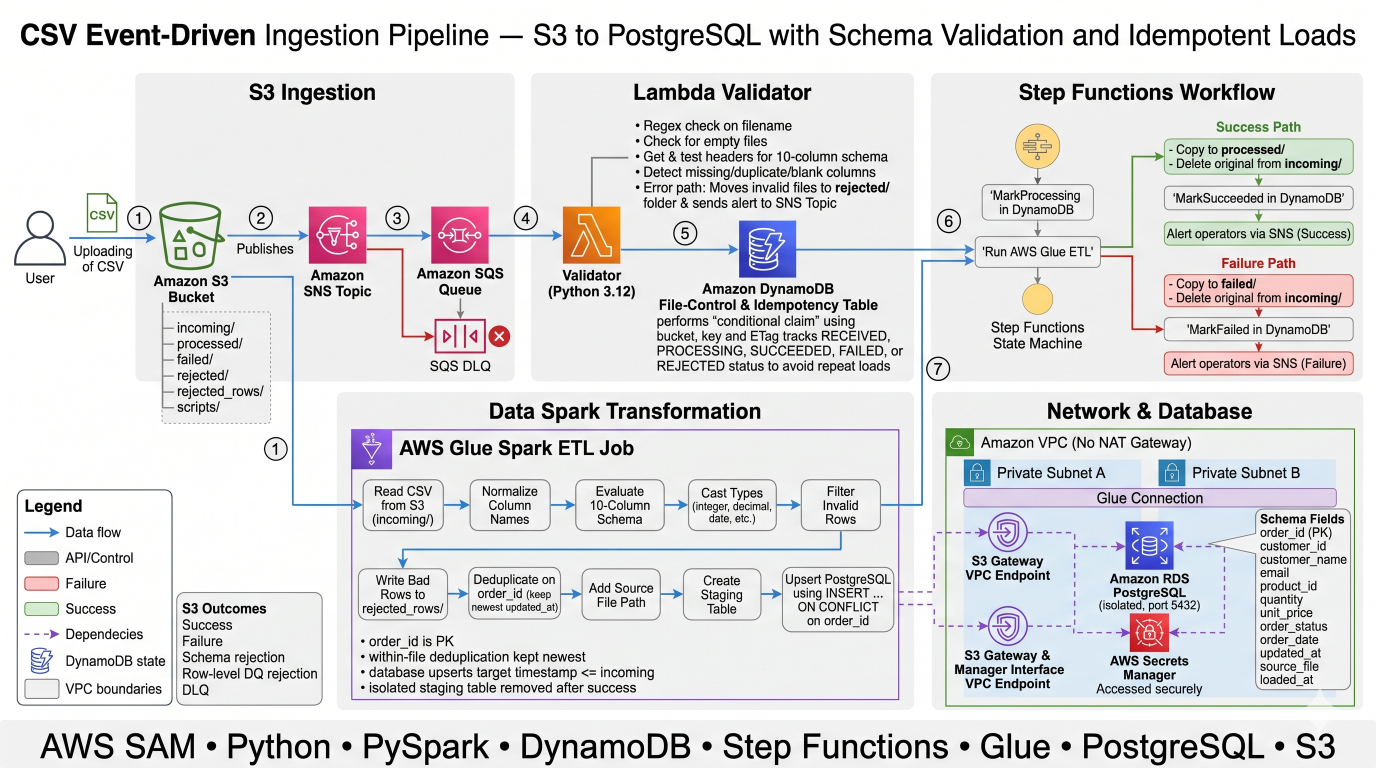
An event-driven, serverless AWS data pipeline that picks up CSV files dropped into S3, validates their schema, deduplicates rows at three levels, and loads clean data into RDS PostgreSQL. Every outcome (success, failure, schema drift) triggers an email alert. The entire infrastructure is defined in a single AWS SAM template.
Why This Project?
Traditional file-to-database pipelines face problems with:
- Duplicate data when the same file is processed twice
- Schema drift breaking downstream tables silently
- No visibility into what succeeded or failed
- Manual re-runs after failures
This pipeline addresses all of them with:
- Three-layer deduplication (file, within-file, database)
- Automatic schema validation before any data is loaded
- DynamoDB-backed idempotency so re-uploads are safe
- Email alerts for every outcome via SNS
- Full audit trail in Step Functions execution history
How the Flow Works
                      ┌─────────────────────────────────────┐
                      │         S3 Bucket (incoming/)        │
                      │   Drop orders_*.csv file here        │
                      └──────────────┬──────────────────────┘
                                     │  s3:ObjectCreated event
                                     ▼
                               SNS Topic
                                     │
                                     ▼
                               SQS Queue ──► Dead Letter Queue (on 3 failures)
                                     │
                                     ▼
                        ┌────────────────────────┐
                        │   Lambda: Validator     │
                        │  • Check filename       │
                        │  • Check file size      │
                        │  • Check CSV header     │
                        │  • Claim in DynamoDB    │
                        └────────────┬───────────┘
                                     │
              ┌──────────────────────┴──────────────────────┐
              │  Invalid                                     │  Valid
              ▼                                             ▼
   Email alert + move to                        Start Step Functions
       rejected/                                           │
                                      ┌────────────────────┼──────────────────────┐
                                      ▼                    ▼                      ▼
                               MarkProcessing         RunGlueJob            (on any error)
                               (DynamoDB)             (PySpark ETL)          MarkFailed
                                                           │                     │
                                      ┌────────────────────┤              FailedCopy → FailedDelete
                                      ▼                    ▼               (move to failed/)
                               ArchiveCopy         Rows written to              │
                               (processed/)         PostgreSQL                  ▼
                                      │             + bad rows to         Email alert
                                      ▼             rejected_rows/
                               MarkSucceeded
                                      │
                                      ▼
                                Email alert
Project Structure
step-functions/
├── template.yaml                     # AWS SAM — all infrastructure as code
├── deploy.sh                         # Linux/macOS deploy script
├── deploy.ps1                        # Windows PowerShell deploy script
│
├── src/
│   └── validator/
│       ├── app.py                    # Lambda function — validates every CSV before loading
│       └── expected_schema.json      # The 10 columns this pipeline expects
│
├── glue/
│   └── csv_to_postgres.py            # PySpark ETL job — transform, dedupe, upsert to PostgreSQL
│
├── statemachine/
│   └── pipeline.asl.json            # Step Functions state machine definition
│
├── sql/
│   ├── ddl.sql                       # PostgreSQL table definition (reference copy)
│   └── verify.sql                   # Queries to confirm data loaded correctly
│
└── tests/
    ├── test_validator.py             # Unit tests — no AWS access needed
    └── data/
        ├── orders_20261106.csv               # Test 1: clean 8-row file
        ├── orders_20261107_overlap.csv       # Test 2: upserts, dedup, bad row
        ├── orders_20261108_extra_column.csv  # Test 4: extra column → rejected
        ├── orders_20261109_missing_column.csv # Test 5: missing column → rejected
        └── sales_report.csv                  # Test 6: wrong filename → rejected
What Each File Does
template.yaml
The single source of truth for all AWS resources. Defines S3, SNS, SQS, Lambda, Step Functions, Glue, DynamoDB, RDS, Secrets Manager, VPC, and IAM roles — everything the pipeline needs.
src/validator/app.py
Lambda function triggered by SQS. For every file upload it:
- Checks the filename matches the expected pattern
- Checks the file is not empty
- Reads only the CSV header (first 64 KB) and compares it to
expected_schema.json - Claims the file in DynamoDB to prevent duplicate processing
- Starts the Step Functions execution if all checks pass
src/validator/expected_schema.json
Lists the 10 column names the pipeline accepts. Any extra, missing, blank, or duplicate column causes the file to be rejected with an email alert.
glue/csv_to_postgres.py
PySpark ETL script that runs inside AWS Glue. It:
- Reads the CSV from S3
- Casts columns to their proper types
- Splits invalid rows to a
rejected_rows/folder - Deduplicates by keeping the latest
updated_atperorder_id - Writes to a per-run staging table
- Runs
INSERT ... ON CONFLICT DO UPDATEinto the final table
statemachine/pipeline.asl.json
Defines the Step Functions workflow with 8 states: MarkProcessing → RunGlueJob → ArchiveCopy → ArchiveDelete → MarkSucceeded → NotifySuccess on success, and MarkFailed → FailedCopy → FailedDelete → NotifyFailure → FailExecution on any error.
sql/ddl.sql
Reference copy of the PostgreSQL table definition. The Glue job creates this table automatically — this file is kept for documentation and manual use.
sql/verify.sql
Two queries to run after loading: row count vs. distinct order count (must match — proves no duplicates) and a full table view ordered by order_id.
tests/test_validator.py
Unit tests for the Lambda validator. Uses in-memory fake AWS clients — no real AWS account needed. Run with pytest tests/.
CSV Schema
The pipeline expects exactly these 10 columns (order does not matter):
| Column | Type | Required |
|---|---|---|
order_id |
VARCHAR(50) PK | Yes |
customer_id |
VARCHAR(50) | Yes |
customer_name |
VARCHAR(200) | No |
email |
VARCHAR(200) | No |
product_id |
VARCHAR(50) | Yes |
quantity |
INTEGER | Yes |
unit_price |
NUMERIC(12,2) | Yes |
order_status |
VARCHAR(30) | No |
order_date |
DATE (yyyy-MM-dd) | Yes |
updated_at |
TIMESTAMP | Yes |
Keep these three files in sync whenever the schema changes:
src/validator/expected_schema.json,glue/csv_to_postgres.py(SCHEMA / KEY / REQUIRED),sql/ddl.sql
AWS Services Used
| Service | Resource | Purpose |
|---|---|---|
| S3 | Data bucket | File drop zone, archive, rejected storage |
| SNS | Ingest topic + Alert topic | S3 event fan-out, email notifications |
| SQS | Ingest queue + DLQ | Buffered delivery with retry, dead-letter handling |
| Lambda | Validator function | Schema and filename validation |
| Step Functions | Pipeline state machine | Orchestrates Glue, archive, and notifications |
| Glue | ETL job (v4.0, G.1X × 2) | PySpark transform and load |
| DynamoDB | Control table | Idempotency and file lifecycle tracking |
| RDS | PostgreSQL db.t4g.micro | Target database |
| Secrets Manager | DB credentials | Auto-generated password, used by Glue |
| VPC | Private subnets + endpoints | Isolates RDS and Glue, no NAT gateway needed |
| CloudWatch | DLQ alarm | Emails you if the validator keeps crashing |
Three-Layer Deduplication
Layer 1 — File level
  Same file uploaded twice → DynamoDB conditional write blocks second run
  (file_id = bucket/key#etag, status must not be RECEIVED/PROCESSING/SUCCEEDED)

Layer 2 — Within a file
  Duplicate order_id rows in same CSV → Spark Window keeps latest updated_at

Layer 3 — Database level
  INSERT ... ON CONFLICT (order_id) DO UPDATE
  ... WHERE orders.updated_at <= EXCLUDED.updated_at
  → Older data can never overwrite newer data
Each Glue run writes to its own staging table (stg_orders_<run_id>) so concurrent runs never collide.
Prerequisites
- AWS CLI v2 configured with an account that has admin or sufficient IAM permissions
- AWS SAM CLI installed
- Python 3.12 (for local unit tests only)
- An email address to receive alerts
Deploy
Linux / macOS
# Set your alert email
export ALERT_EMAIL="you@example.com"

# Navigate to the project
cd step-functions

# Deploy (type y when SAM asks to confirm)
./deploy.sh csv-pipeline
Windows (PowerShell)
# Set your alert email
$env:ALERT_EMAIL = "you@example.com"

# Navigate to the project
cd "step-functions"

# Deploy (type y when SAM asks to confirm)
.\deploy.ps1 csv-pipeline
The deploy script runs sam build, then sam deploy, then uploads the Glue script to S3.
Takes ~15–20 minutes because RDS provisioning takes ~10 minutes.
After deploy, SAM prints the stack outputs. Save your bucket name:
Linux / macOS
export B=$(aws cloudformation describe-stacks --stack-name csv-pipeline \
  --query "Stacks[0].Outputs[?OutputKey=='DataBucketName'].OutputValue" --output text)
echo "Bucket: $B"
Windows (PowerShell)
$env:B = aws cloudformation describe-stacks --stack-name csv-pipeline `
  --query "Stacks[0].Outputs[?OutputKey=='DataBucketName'].OutputValue" --output text
Write-Host "Bucket: $env:B"
Important: Check your inbox for an AWS SNS subscription confirmation email and click the link. Without this, you will not receive any alert emails.
Run Unit Tests (No AWS Needed)
pip install boto3 pytest
pytest tests/
Test Scenarios
Run each scenario one at a time. Wait for the email before moving to the next.
Linux / macOS
# Test 1 — Happy path: 8 rows loaded, success email, file archived to processed/
aws s3 cp tests/data/orders_20261106.csv s3://$B/incoming/

# Test 2 — Upserts + dedup + bad row
# O1003 updated to SHIPPED, O1010 deduped (PAID wins), stale O1001 ignored,
# blank order_id row written to rejected_rows/, success email
aws s3 cp tests/data/orders_20261107_overlap.csv s3://$B/incoming/

# Test 3 — Re-upload Test 1 (same file, same etag)
# DynamoDB blocks re-processing — no duplicate rows, no Glue run
aws s3 cp tests/data/orders_20261106.csv s3://$B/incoming/

# Test 4 — Extra column: coupon_code
# "Schema change detected" email, file moved to rejected/, Glue never runs
aws s3 cp tests/data/orders_20261108_extra_column.csv s3://$B/incoming/

# Test 5 — Missing column: email
# "File rejected" email, file moved to rejected/, Glue never runs
aws s3 cp tests/data/orders_20261109_missing_column.csv s3://$B/incoming/

# Test 6 — Wrong filename pattern
# "File rejected" email instantly (no S3 read needed), file moved to rejected/
aws s3 cp tests/data/sales_report.csv s3://$B/incoming/
Windows (PowerShell)
# Test 1 — Happy path
aws s3 cp tests\data\orders_20261106.csv "s3://$env:B/incoming/"

# Test 2 — Upserts + dedup + bad row
aws s3 cp tests\data\orders_20261107_overlap.csv "s3://$env:B/incoming/"

# Test 3 — Re-upload Test 1 (idempotency check)
aws s3 cp tests\data\orders_20261106.csv "s3://$env:B/incoming/"

# Test 4 — Extra column
aws s3 cp tests\data\orders_20261108_extra_column.csv "s3://$env:B/incoming/"

# Test 5 — Missing column
aws s3 cp tests\data\orders_20261109_missing_column.csv "s3://$env:B/incoming/"

# Test 6 — Wrong filename
aws s3 cp tests\data\sales_report.csv "s3://$env:B/incoming/"
Tests 1 and 2 trigger Glue. Allow 3–5 minutes for the first run (Glue cold start). Tests 3–6 are handled entirely by Lambda — email arrives in ~30 seconds.
Expected Final State in PostgreSQL
After all 6 tests, the orders table holds exactly 10 rows with no duplicates:
| order_id | order_status | Note |
|---|---|---|
| O1001 | NEW | Stale CANCELLED update (older updated_at) was blocked |
| O1002 | NEW | — |
| O1003 | SHIPPED | Updated by test 2 (newer updated_at) |
| O1004 | PAID | — |
| O1005 | NEW | — |
| O1006 | PAID | — |
| O1007 | NEW | — |
| O1008 | PAID | — |
| O1009 | NEW | New order from test 2 |
| O1010 | PAID | Deduplicated within test 2 file — PAID row had newer updated_at |
Verify in PostgreSQL
Since RDS is in a private VPC, connect via CloudShell VPC environment or a bastion EC2 with SSH tunnel (pgAdmin supports SSH tunnels natively).
-- Row count must equal distinct order count — proves zero duplicates
SELECT count(*)                 AS total_rows,
       count(DISTINCT order_id) AS distinct_orders
FROM public.orders;

-- Full table view
SELECT order_id, customer_name, order_status, updated_at, source_file
FROM public.orders
ORDER BY order_id;
Monitor the Pipeline
Check Step Functions executions
Linux / macOS
SM=$(aws cloudformation describe-stacks --stack-name csv-pipeline \
  --query "Stacks[0].Outputs[?OutputKey=='StateMachineArn'].OutputValue" --output text)

aws stepfunctions list-executions --state-machine-arn $SM \
  --query "executions[*].{name:name, status:status}" --output table
Windows (PowerShell)
$SM = aws cloudformation describe-stacks --stack-name csv-pipeline `
  --query "Stacks[0].Outputs[?OutputKey=='StateMachineArn'].OutputValue" --output text

aws stepfunctions list-executions --state-machine-arn $SM `
  --query "executions[*].{name:name, status:status}" --output table
Check DynamoDB control table
# Linux / macOS
aws dynamodb scan --table-name csv-pipeline-file-control \
--query "Items[*].{file_id:file_id.S, status:status.S}"# Windows
aws dynamodb scan --table-name csv-pipeline-file-control `
--query "Items[*].{file_id:file_id.S, status:status.S}"Check S3 folders
# Linux / macOS
aws s3 ls s3://$B/processed/
aws s3 ls s3://$B/rejected/
aws s3 ls s3://$B/rejected_rows/ --recursive
aws s3 ls s3://$B/failed/# Windows
aws s3 ls "s3://$env:B/processed/"
aws s3 ls "s3://$env:B/rejected/"
aws s3 ls "s3://$env:B/rejected_rows/" --recursive
aws s3 ls "s3://$env:B/failed/"Retry a Failed File
If a file lands in failed/, fix the root cause (Glue error, DB connectivity), then copy it back:
# Linux / macOS
aws s3 cp s3://$B/failed/orders_20261106.csv s3://$B/incoming/orders_20261106.csv# Windows
aws s3 cp "s3://$env:B/failed/orders_20261106.csv" "s3://$env:B/incoming/orders_20261106.csv"The DynamoDB entry for FAILED files is allowed to be re-claimed, so the pipeline will process it again.
Adapting to a Different CSV
- Update
src/validator/expected_schema.json— change the column list - Update
glue/csv_to_postgres.py— changeSCHEMA,KEY,REQUIREDconstants and theDDLstring - Update
sql/ddl.sql— keep it in sync with the Glue DDL - Update the
FilePatternparameter intemplate.yamlif the filename pattern changes
Estimated Cost
Running the pipeline for ~1 hour (deploy + 6 tests + delete):
| Service | Cost |
|---|---|
| RDS db.t4g.micro (ap-south-1) | ~$0.018 |
| Secrets Manager interface endpoint | ~$0.010 |
| Glue (2 runs × 2 DPUs × 10 min minimum) | ~$0.293 |
| Lambda, Step Functions, SNS, SQS, DynamoDB, S3 | ~$0.000 (free tier) |
| Total | ~$0.32 |
RDS and the Secrets Manager endpoint are the only always-on costs. Delete the stack as soon as you are done to stop all charges.
Cleanup
These commands permanently delete all resources and data.
Step 1 — Empty the S3 bucket
# Linux / macOS
aws s3 rm s3://$B --recursive# Windows
aws s3 rm "s3://$env:B" --recursiveStep 2 — Delete the SAM stack
# Linux / macOS
sam delete --stack-name csv-pipeline --no-prompts# Windows
sam delete --stack-name csv-pipeline --no-promptsTakes ~5–10 minutes. Removes RDS, Lambda, Glue, Step Functions, SNS, SQS, DynamoDB, VPC, Secrets Manager secret, and CloudWatch alarm.
Step 3 — Delete the SAM-managed deployment bucket (optional)
SAM creates its own S3 bucket for deployment artifacts. Find and remove it:
# Linux / macOS
aws s3 ls | grep aws-sam-cli-managed
# Then:
aws s3 rb s3://<bucket-name> --force# Windows
aws s3 ls | Select-String "aws-sam-cli-managed"
# Then:
aws s3 rb s3://<bucket-name> --forceStep 4 — Verify everything is gone
# Should all return errors or empty output
aws cloudformation describe-stacks --stack-name csv-pipeline
aws rds describe-db-instances --query "DBInstances[?DBName=='ordersdb']"
aws glue get-job --job-name csv-pipeline-csv-to-postgres
aws dynamodb describe-table --table-name csv-pipeline-file-control
Operations Notes
| Situation | Action |
|---|---|
| DLQ alarm fires | Validator is crashing repeatedly.Check Lambda logs in CloudWatch (/aws/lambda/csv-pipeline-validator) |
File stuck in failed/ |
Fix the cause, copy file back to incoming/ |
| Same file needs re-processing | Only allowed if its DynamoDB status is FAILED or REJECTED |
| New column added to source | Update schema in all three sync files, redeploy |
| Want to change file naming convention | Update FilePattern parameter in template.yaml, redeploy |
| Check Glue run logs | CloudWatch Logs group: /aws-glue/jobs/output |